Email notifications
The notification switches for administrators and employees, the birthday wishes and the periodic team holiday summary with its frequency, day and time.
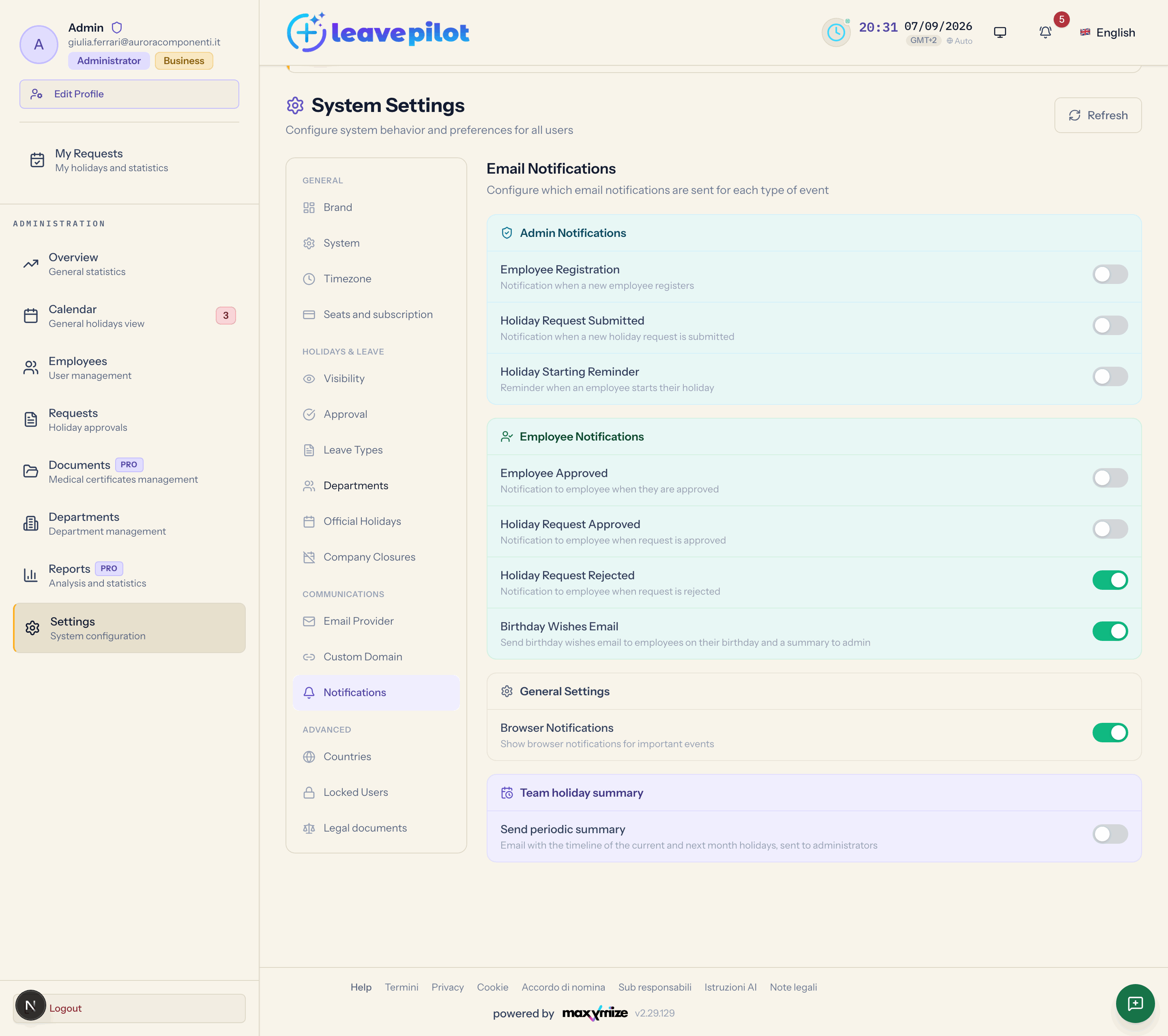
The Notifications section (Email Notifications, "Configure which email notifications are sent for each type of event") gathers the email switches in four cards. Changes are saved with Save changes.
What actually goes out
In the current version the operational emails described in Emails and notifications (new registration, new request, request approved or rejected, account approved) are sent according to the platform's own rules, regardless of the switches in the first two cards. The switches that really govern a send are Birthday Wishes Email and the ones under Team holiday summary.
In an organisation where this section has never been saved, the six switches in the first two cards show up off: it is not a fault, and it does not mean the emails are disabled, because they go out all the same. If you want the switches to match reality, turn them on and save: the behaviour does not change, only what you see does.
Admin Notifications
| Switch | Description shown |
|---|---|
| Employee Registration | Notification when a new employee registers |
| Holiday Request Submitted | Notification when a new holiday request is submitted |
| Holiday Starting Reminder | Reminder when an employee starts their holiday (requires the Pro plan) |
The new registration email and the new request email reach every active administrator (the second one also reaches the department manager, in the Admin and department manager mode). The holiday starting reminder is not live in the current version.
Employee Notifications
| Switch | Description shown |
|---|---|
| Employee Approved | Notification to employee when they are approved |
| Holiday Request Approved | Notification to employee when request is approved |
| Holiday Request Rejected | Notification to employee when request is rejected |
| Birthday Wishes Email | Send birthday wishes email to employees on their birthday and a summary to admin (requires the Pro plan) |
Birthday wishes
With Birthday Wishes Email on, every day at 10:00 UTC (12:00 in Italy in summer, 11:00 in winter) the active people whose birthday it is receive Happy Birthday, {name}! in their own language, and the administrators receive Compleanni oggi - {date} ("birthdays today", sent in Italian) with the name, email and department of the people celebrating. Everyone needs a Date of Birth in their profile. Default: off.
General Settings
| Switch | Description shown | Default |
|---|---|---|
| Browser Notifications | Show browser notifications for important events (requires the Pro plan) | on |
In the current version LeavePilot does not send browser notifications: the switch has no effect.
Team holiday summary
| Setting | Description shown | Values |
|---|---|---|
| Send periodic summary | Email with the timeline of the current and next month holidays, sent to administrators | on / off (default) |
| Frequency | How often to send the summary | Every day, Every week (default), Every month |
| Day of week (weekly only) | Which day to send the weekly summary | from Monday (default) to Sunday |
| Day of month (monthly only) | The monthly summary is sent on the first day of the month | Day 1, fixed |
| Send time | Company local time to send the summary | 06:00, 07:00, 08:00, 09:00 (default), 10:00, 11:00, 12:00, 14:00, 16:00, 18:00, 20:00 |
The time is the one in the Company timezone of Timezone and date format. Every active administrator receives Riepilogo ferie team — {month} – {month year}, always in Italian, with:
- Richieste da approvare ("requests to approve"): the pending requests (at most 50), or "Nessuna richiesta in attesa. Tutto in regola!" (no pending requests, all caught up);
- the timeline of the current month and the next one with everybody's approved absences, coloured by type, with weekends and company closures;
- the legend.
The summary goes out at most once a day. If you turn it on today with a weekly frequency and Monday as the day, the first one arrives next Monday at the time you chose.
The full list of the messages you get as an administrator is in Emails the administrator receives.