Creating the organisation
How you open your company workspace: the signup form, confirming the address, the creation of the workspace and the free trial.
A company workspace is created from the public site, in a minute, and whoever creates it becomes its first administrator. No credit card is needed: you start with fourteen days of full trial and then, if you do not pick a plan, you move to the free plan.
Where to start
Open leavepilot.app and press Start free (top right, or at the bottom of the page), or go straight to leavepilot.app/en/signup. The page is titled Create your company workspace.
The form
The fields, in the order they appear:
- Company name. From 2 to 120 characters. It is the name that will appear in emails and on the sign-in page, and the one your workspace address is suggested from.
- Your name. From 2 to 100 characters.
- Your email address. It is used to confirm it is really you and it becomes your username. If you use a personal address (Gmail, Outlook, Libero and the like) the notice You are using a personal address appears: the workspace is created all the same, but your colleagues will not be able to register on their own with the same domain and you will have to invite them from the admin panel. With a company address, instead, anyone with an email on the same domain will be able to join on their own, if you want that.
- Password. As you type, the list of requirements appears, with a tick next to the ones you have met: At least eight characters, One uppercase letter, One lowercase letter, One number, One symbol. Passwords that are too common are refused.
- Your workspace address. It is the part before
.leavepilot.appand it is suggested from the company name: "Aurora Componenti S.r.l." becomesaurora-componenti-s-r-l. You can change it now, not later. Only lowercase letters, numbers and hyphens are allowed, from 3 to 40 characters, with no hyphen at the start or at the end. Some names are reserved for running the platform (for examplewww,app,admin,mail,support,help) and have to be changed. - The checkbox I accept the Terms of Service and the data processing agreement, and I declare that I have the authority to bind the company I represent. The two documents open in a new tab; you can read them before ticking. Without the tick the form does not go through.
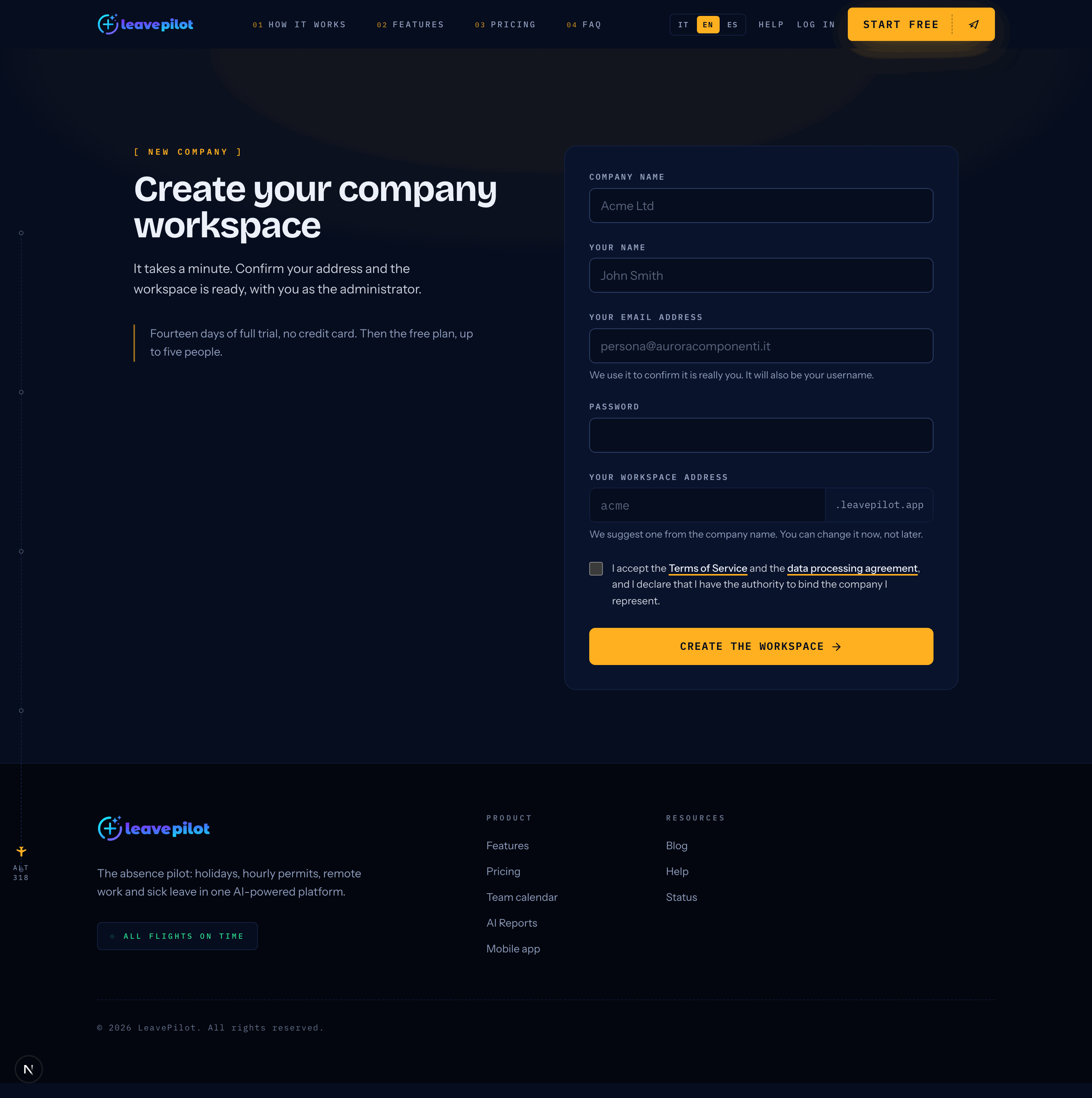
Press Create the workspace.

Messages you may see
| Message | What it means |
|---|---|
| No address can be derived from this name: add a few letters or a number. | The company name contains too few characters that can be used in the address. |
| That address is reserved for the platform. Please choose another one. | You have picked one of the reserved names. |
| There is already a signup in progress with this email address. Check your inbox: we have written to you. | A signup with the same email has not been completed yet. Look for the confirmation message, in the junk folder too. |
| Too many attempts. Try again in an hour. | At most 5 signups an hour are allowed from the same connection and 3 an hour with the same email address. |
| This password is not strong enough. | Read the requirements again: something is missing or the password is too common. |
Confirm your email address
Once you submit, you see the Check your inbox screen: we have written to the address you gave. The workspace is only created after you confirm, because every workspace is a real database.
The email has the subject Confirm your address to create {company name} and contains the button Confirm and create the workspace. The link is valid for 24 hours.
- If you do not find the message within a couple of minutes, look in the junk folder, then use Send the message again: you press it once per screen and it becomes Done, check again.. A new message only really goes out if the previous one is more than two minutes old; to try again, reload the signup page.
- If you got the address wrong, use Wrong address? Start over.
Opening the link takes you to a page that confirms on your behalf, showing One moment, we are confirming…. It is a page and not a link that acts on its own: that way the antivirus systems on company mailboxes, which open incoming links, do not create the workspace instead of you.
| If you see | What to do |
|---|---|
| The link has expired | More than 24 hours have passed. Press Start the signup again. |
| This link is no longer valid | It has already been used, or it belongs to a signup that was cancelled. If the workspace was not created, start over. |
Creating the workspace
Once the address is confirmed, the page Creating {company name} shows the progress, Step N of 8, with the eight stages:
- Creating the database
- Preparing the initial data
- Default settings
- Registering the address
- Publishing the workspace
- Connecting to the platform
- Activating the organisation
- Starting the trial
It takes from under a minute to a few minutes. You can stay and watch: the page refreshes itself every two seconds.
If the address is already taken
If someone else has taken the same address in the meantime, That address is already taken appears with a free suggestion and the button Use {suggested}. With Let me choose you can type one of your own and confirm with Continue with this one. The same rules as in the form apply.
If it takes longer than usual
After fifteen minutes with no progress, This is taking longer than usual appears with the Retry button, which reloads the status without losing what you entered.
If it fails
We could not create the workspace tells you which stage the work stopped at. Nothing was created and nothing was charged. Write to support@leavepilot.app quoting the code shown on the page, or press Start the signup again.
The workspace is ready
When everything is done you see {company name} is ready, with your workspace address in the form {address}.leavepilot.app and the button Go to your workspace. You also receive the email {company name} is ready on LeavePilot, with the same link, so you do not lose it.
Sign in with the email address and password you chose during signup. The first login asks you to complete your profile: see First login and onboarding. Then follow the recommended initial setup.
The free trial
- It lasts 14 days and includes the features of the Pro plan.
- No credit card is needed: it is only asked for if you decide to continue on a paid plan.
- A few days before it ends you get a reminder by email with the exact date; when it ends you get the confirmation of the move to the free plan, which does not expire and includes up to five people.
- Nobody is deactivated when the trial ends: the people and the data stay where they are. The Pro features (smart working and hourly leave, medical certificates, reports, logo, departments and more than one country) stop being available until a plan is activated.
Everything about plans, seats and expiry is in Plans and free trial.
How long the data of an unfinished signup is kept
If you do not confirm the address, the password hash is deleted after 24 hours and the signup record after 30 days. No workspace is created.