Leave types and allowances
The annual vacation, personal leave, sick leave and smart working days for the whole organisation, the country and department overrides, and applying them to every employee.
The Leave Types section (the card carries the same name, with the line "Configure leave types and annual quotas") sets the annual allowances for the four types of absence. The types are fixed: Vacation, Personal day, Sick leave, Smart Working; you cannot create new ones and you cannot turn them off.
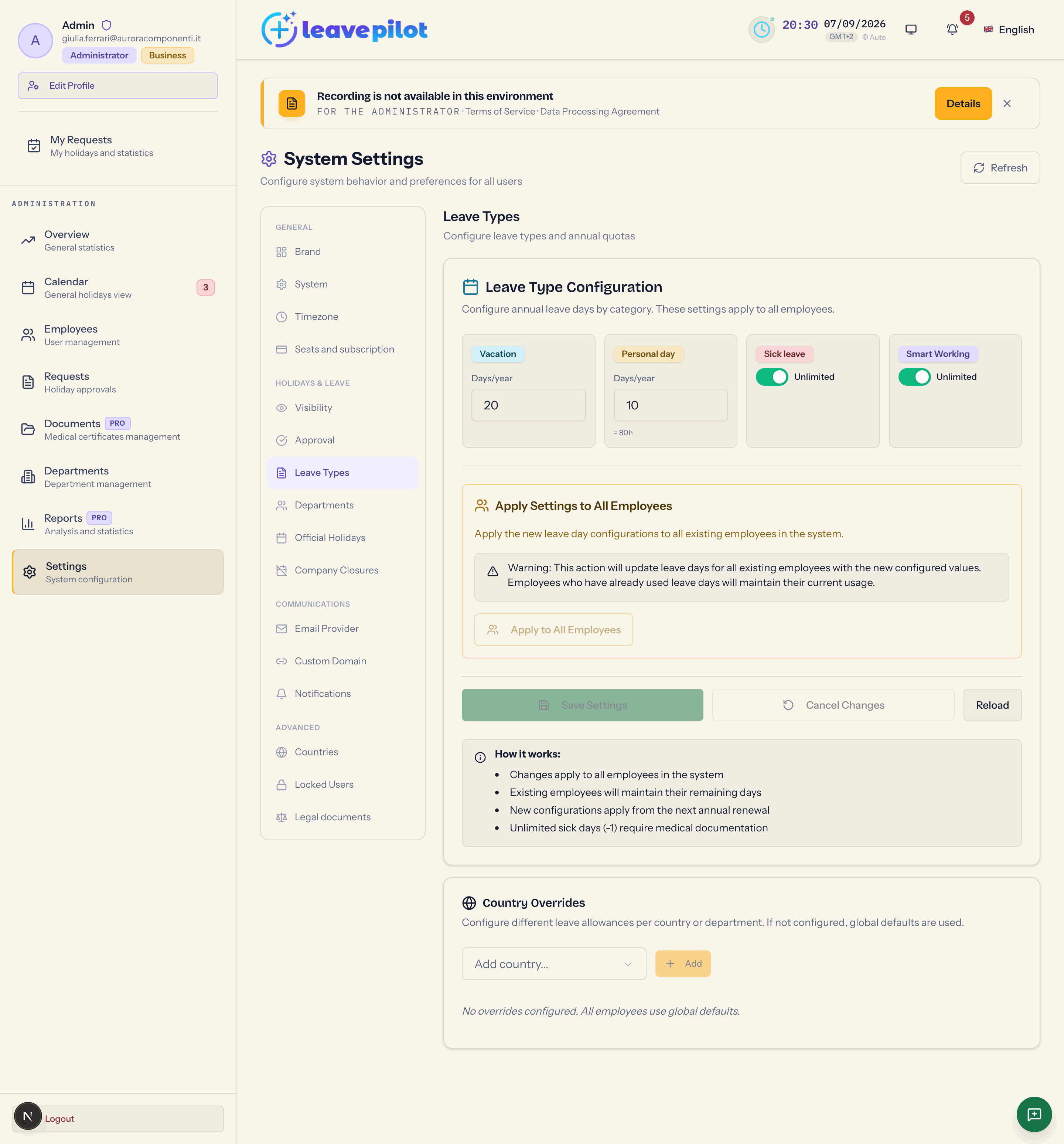
Leave Type Configuration
"Configure annual leave days by category. These settings apply to all employees."
| Type | Control | Default |
|---|---|---|
| Vacation | Days/year, 1 to 365 | 20 |
| Personal day | Days/year, 1 to 365; the equivalent in hours appears underneath (= 80h) | 10 |
| Sick leave | Unlimited switch; turn it off and you get Days/year, 0 to 365 | unlimited |
| Smart Working | Unlimited switch; turn it off and you get Days/year, 0 to 365 | unlimited |
When there are pending changes, You have unsaved changes appears. Press Save Settings: Settings Saved, Updated {n} leave types. Cancel Changes restores the values, Reload reads them again.
How the allowances behave:
- when a request in days is created for vacation, personal leave or smart working, the days already approved plus those pending in the year plus those being asked for cannot exceed the allowance (Non hai giorni sufficienti per questo tipo di congedo, Italian for "you do not have enough days for this leave type"; the server sends this message untranslated);
- sick leave is never checked against an allowance, even if you set one: the value is informational;
- hourly personal leave and hourly smart working use a balance in hours, counting 8 hours to the day.
A changed allowance applies straight away to requests for the current year, because the count goes by the year of the start date.
Apply to All Employees
The Apply Settings to All Employees box ("Apply the new leave day configurations to all existing employees in the system.") has the Apply to All Employees button, which is active only when there are unsaved changes. It saves the vacation, personal leave and sick leave allowances and aligns the vacation value recorded on every active person, except anyone with a personal exception (which stays untouched and is listed in the response). Confirmation: Application Completed, Updated {n} employees with the new settings.
Where a person's allowance comes from
For each type, the first rule that exists wins:
- the personal exception on vacation, set from the Employees tab (Holiday days);
- the department override;
- the country override;
- the general value in this section.
Country Overrides
"Configure different leave allowances per country or department. If not configured, global defaults are used."
- The Add country... menu lists the active countries (see Countries) that have not been configured yet; Add creates the four overrides for that country with the initial values 20, 10, unlimited, unlimited (Override saved successfully).
- Each country expands into four tabs, one per type, with the Unlimited switch and the Days/year field (0 to 365). Changes save on their own half a second after you stop typing.
- The bin next to the country deletes all of its overrides (Override removed successfully).
Department Overrides
Under every country that has departments you get Department Overrides, with one row per department. For each type you can press Override to create the department override with the country value, or see the value already there (20g, ∞) with the bin to delete it. The g stands for the Italian "giorni", days, and is not translated. The value of a department override cannot be edited in place: delete it and create it again once you have changed the country one.
A department override beats the country one; the country one applies to whoever has that country, either in their profile or inherited from their department.
How it works (info box)
The How it works: box lists four points: changes apply to all employees, existing employees keep their remaining days, new configurations apply "from the next annual renewal", and unlimited sick leave requires medical documentation. The third line does not match the real behaviour: as explained above, a changed allowance applies straight away to requests for the current year.